
How to know which subtitles are available
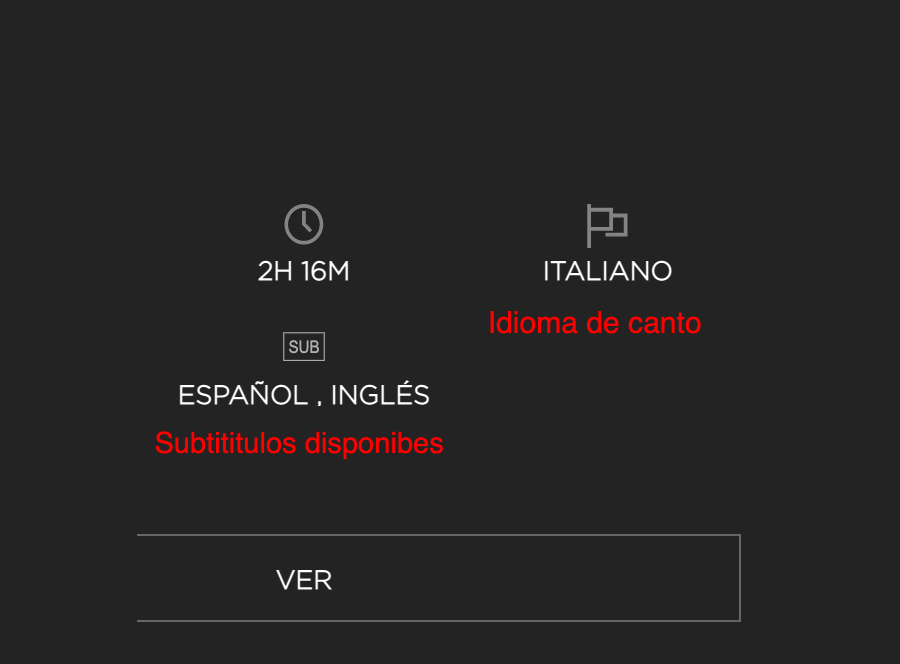
Information regarding available subtitles is always displayed on the content page. In the image, we show an example where the opera’s language is Italian, and the available subtitles are in Spanish and English.
In some productions, subtitles will appear automatically; if you have chosen to view our site in Spanish, they will be displayed directly in Spanish.
Are there differences between devices?
Depending on the device used, if optional subtitles are available, the video player may behave in one of the two ways explained below.
(In some titles, subtitles cannot be selected from the player).
Desktop computers and Android
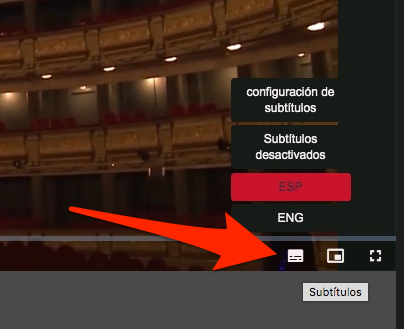
If you are using a desktop browser or Chrome on Android, you will find this icon in the bottom right area of the player. Note that clicking it opens a menu to enable or disable subtitles. You can also configure their appearance.
iOS devices (iPhone and iPad)
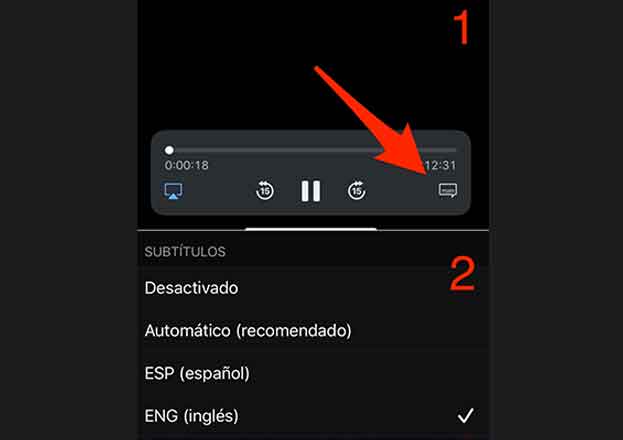
If you are using an iPhone or iPad, start the video playback and, once the video is in full screen:
- Tap on the indicated icon and
- Select the desired language.
You can configure their appearance from your device settings.